

A practical guide to trim, split, join, and friends
String manipulation shows up everywhere, interviews included.
Yet many developers freeze because strings feel “magical”.
They’re not.
Once you see the patterns, it becomes mechanical.
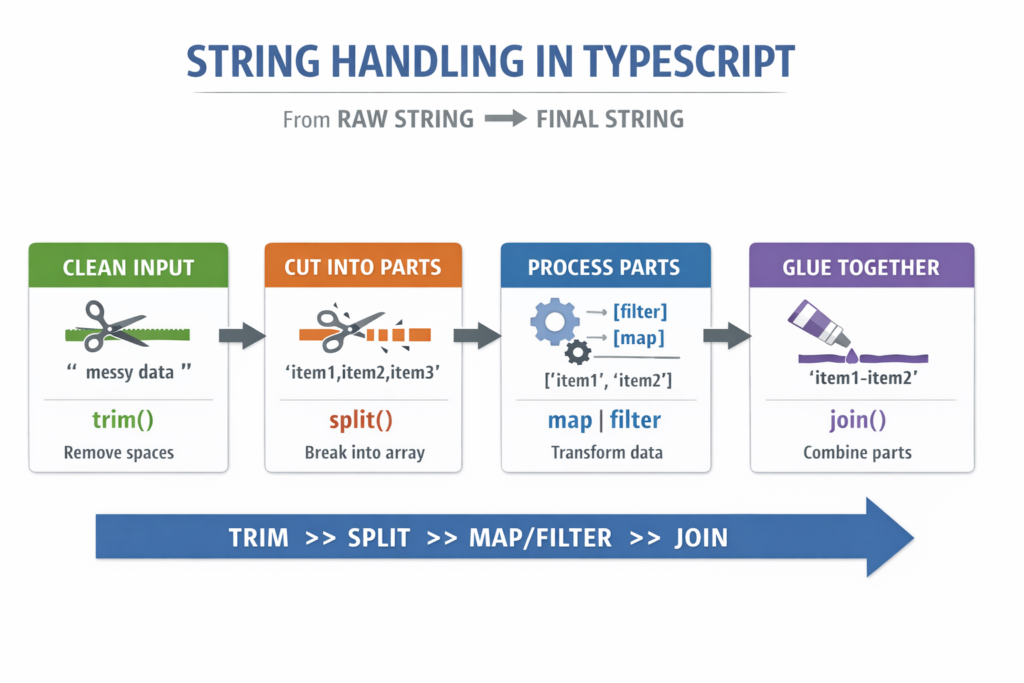
The Core Mental Model
Strings are immutable.
You don’t change them, you create new ones.
Most string problems follow one of these flows:
- Clean input
- Cut into parts
- Process parts
- Glue back together
That’s it.
trim() – Clean the edges
Removes whitespace at the start and end only.
" hello ".trim(); // "hello"
Use it:
- Before validation
- Before comparisons
- Before early returns
Interview habit:
if (text.trim() === '') {
  return '';
}
This is a senior move.
split() – Cut into pieces
Turns one string into an array.
"hello world".split(" "); // ["hello", "world"]
"1,2,3".split(",");       // ["1", "2", "3"]
Use it when:
- You need to loop
- You need to inspect each part
Rule:
Strings don’t loop. Arrays do.
join() – Glue back together
Turns an array into a string.
["hello", "world"].join("-"); // "hello-world"
split and join are almost always used together.
Pattern:
string
→ split
→ process
→ join
replace() – Simple swap
Replaces part of a string.
"hello world".replace(" ", "-"); // "hello-world"
Important:
- Replaces only the first match
- Use regex with
gfor global replace
"text with spaces".replace(/\s+/g, " ");
Use it when:
- No loop needed
- Simple find-and-replace
Common Supporting Methods (Must-Know)
Case normalization
"Hello".toLowerCase();
"hello".toUpperCase();
Checks
"hello".includes("he");      // true
"file.ts".endsWith(".ts");  // true
Extraction
"hello".slice(1, 4); // "ell"
"hello".charAt(0);   // "h"
Length
"hello".length; // 5
Decision Guide (Burn This In)
- Need to clean input? →
trim - Need to inspect parts? →
split - Need final string? →
join - Simple swap? →
replace - Edge case first? → early return