

“DOM” is one of those words everyone uses and half the people misunderstand.
If you write UI tests and don’t truly get the DOM, you will write fragile tests. Period.
Let’s fix that.
DOM does NOT mean HTML
DOM = Document Object Model
HTML is a file.
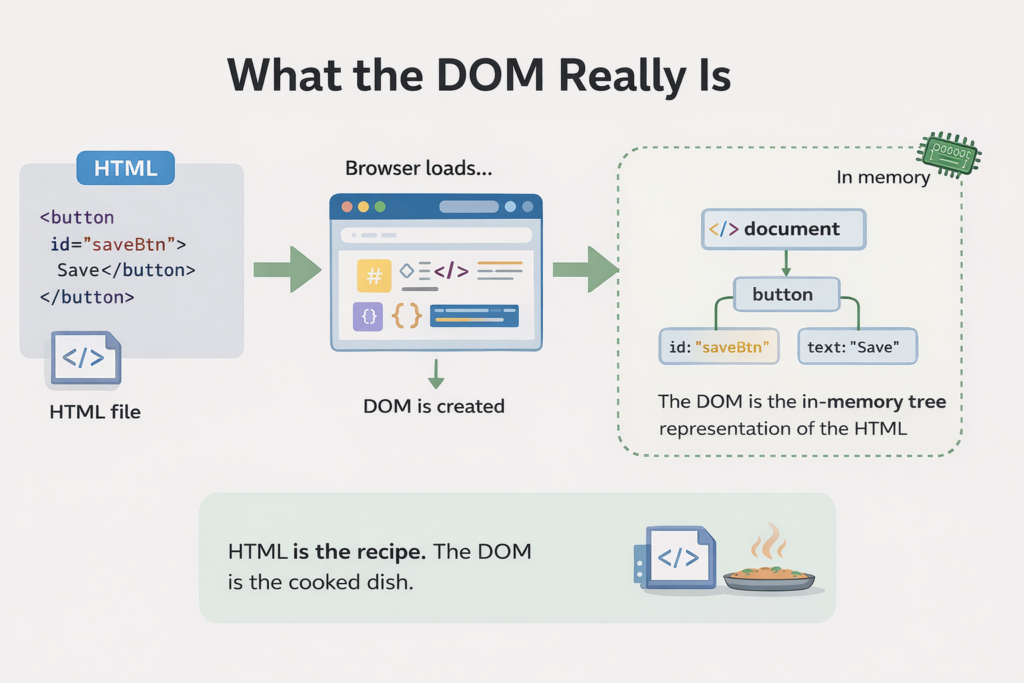
The DOM is a live, in-memory structure created by the browser after loading that file.
Once the page is loaded, everything talks to the DOM, not the HTML:
- JavaScript
- CSS
- Playwright
- Screen readers
If you are selecting HTML, you are already too late.
The DOM is a tree, not a string
This HTML:
<button id="saveBtn">Save</button>Becomes this DOM structure:
document
 └─ button
     ├─ id = "saveBtn"
     └─ text = "Save"
That button is now an object in memory, not text in a file.
When Playwright clicks, it clicks that object.
The DOM is dynamic (this is the killer detail)
The DOM changes all the time.
JavaScript can:
- insert elements
- remove elements
- rename classes
- wrap elements
- move things around
Without reloading the page.
This means:
Your selector can be correct today and broken tomorrow, even if the feature still works.
That’s why tests rot.
Why DOM-based selectors are fragile
Example:
page.locator('button > span.label').click()This breaks if:
- a wrapper div is added
- the span is removed
- styles are refactored
None of these changes affect users.
All of them break your test.
That’s a bad trade.
DOM vs Accessibility Tree (critical difference)
Most people don’t know this part.
DOM
- Structure-based
- Tags, classes, IDs
- Implementation detail
Accessibility Tree
- Meaning-based
- Roles, names, labels
- What users and screen readers perceive
Playwright’s getByRole() uses the accessibility tree, not raw DOM structure.
Why this selector is better
❌ DOM-based:
page.locator('button:has-text("Save")').click()✅ Accessibility-based:
page.getByRole('button', { name: 'Save' }).click()Why this survives refactors:
- Text “Save” stays
- Role stays
- DOM structure can change freely
Your test stays green.
IDs are not a silver bullet
This looks safe:
page.click('#saveBtn')It isn’t.
IDs:
- get renamed
- get duplicated
- get removed during redesigns
- are often generated
They are implementation details, not user contracts.
How Playwright wants you to think
Playwright pushes you toward this mindset:
“Select elements the way users understand them.”
Users don’t see:
- IDs
- classes
- DOM depth
They see:
- buttons
- labels
- text
- roles
That’s not an accident. It’s design.
The testing rule that actually matters
If your selector breaks when UI structure changes but user behavior doesn’t, the selector is wrong.
Practical takeaway
Use:
- getByRole
- getByLabel
- getByText (carefully)
Avoid:
- deep CSS selectors
- structural selectors
- styling-based selectors
DOM is an implementation detail.
User intent is the contract.
Final thought
Understanding the DOM is not about memorizing selectors.
It’s about knowing what is stable and what is not.
If your tests keep breaking, it’s usually not Playwright’s fault.
It’s your mental model.
Fix that, and everything else gets easier.